
What is an API?
API (Application Programming Interface) means a technical interface to be used by developers when integrating applications with other systems. An API can (and should!) be designed in a way that makes it possible for both coders and non-coders to understand it.
HTTP(S) and HTTP methods
Most APIs use HTTPS – a secure and standardised way for an application to send requests to a server and for a server to send responses in return.
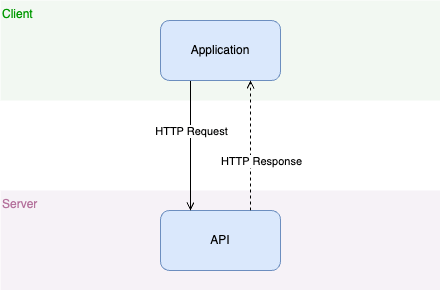
Requests and responses are basically text messages of a certain format. Let’s have a brief look at how they are used.
HTTP requests
Example: A request to https://example.com/messages
GET /messages?sender=Peter

host: example.com
Each request must contain a method (GET in the example above) and a URI (/messages?sender=Peter in the example above). Requests also contains headers (host: example.com).
The HTTP method tells the server if there is a body in the request or not.
Requests of method POST, PATCH and PUT must have a body while GET and DELETE don’t have a body.
Example: A POST request to https://example.com/messages
POST /messages

host: example.com
content-length: 32
content-type: application/json

{"text":"Hello!","from":"Peter"}
The body in this example is: {"text":"Hello!","from":"Peter"}.
Header content-length: 32 tells the server that the body consists of 32 characters
Header content-type: application/json tells the server that the body is sent in JSON format (more on JSON below).
Responses
HTTP responses
An HTTP response contains a status code, headers and may contain a body.
Status codes
Status codes are an important part of the HTTP specification and can be found here but only a subset of the codes are normally used in APIs and we will take a look at a few of the most common ones.
2XX
Status codes from 200 to 299 (aka 2XX) means the server was able to successsfully handle the request
| Status code | Description |
| 200 | OK – standard way to indicate success |
| 201 | Created – something was created successfully |
| 204 | No content – successful request but no body is returned |
3XX
Status codes from 300 to 399 (aka 3XX) may be used to redirect API calls.
4XX
Status codes from 400 to 499 (aka 4XX) means there is something wrong with the request sent from the client.
| Status code | Description |
| 400 | Bad request |
| 401 | Unauthorized – actually means authentication failure |
| 403 | Forbidden – request was not authorized |
| 404 | Not found – the request URI was not found |
| 405 | Method not allowed |
5XX
Status codes from 500 to 599 (aka 5XX) means the request could not be processed because of an error on the server side.
Example: A response to a GET request for https://example.com/messages
200

content-type: application/json
content-length: 12

{"items":[]}
200 (status code OK) says the server was able to process the request successfully
content-type: application/json says the response body is in JSON format.
content-length: 12 says the body contains 12 characters
JSON
JSON is a simple format for describing data and can be read by non-coders, coders and computers. It consists of only a six types.
| Type | Example 1 | Example 2 |
| array | [3,6,22] | [{ "name":"Peter","age": 42},{ "name":"Laura","age": 39}] |
| boolean | true | false |
| null | null | null |
| number | 78 | 780066.537 |
| object | {"name":"Peter"} | {"names": ["Peter","Foo"],"age": 42} |
| string | "name" | "A longer string" |
The full JSON specification of JSON can be found here but it should be easy enough to just look at some examples to understand the format.
JSON objects
A JSON object contains zero or more unique keys and values where each key is a string. The values can be of any JSON type.
JSON object keys are sometimes referred to as “fields”, “properties”, or “attributes”.
Example: A JSON object with three unique keys and their values
{
  "key1": "this",
  "key2": "is",
  "key3": "good",
}
JSON object keys are unique
JSON object keys must be unique
{
  "key1": "this",
  "key2": "is",
  "key1": "bad",
  "key1": "JSON"   <--- "key1" is duplicated!
}
Duplicated keys as above are not allowed.
JSON object keys have no order
It may be easer to read a JSON object when the keys are ordered in a certain way but JSON object keys are not ordered. It is not possible to say that one key comes before another key.
The two JSON objects below are identical
{ "key1": "easy", "key2": "to", "key3": "read"} | { "key2": "to", "key1": "easy", "key3": "read"} |
Where are JSON objects used in APIs?
JSON objects are typically used to model real objects of a business. It can be a message, a person or an order and the models often consists of different nested JSON objects. JSON objects are often used in request bodies of POST, PATCH or PUT to create or modify a business object.
Example of an JSON Object representing an order item:
{
  "orderId": "716253",
  "created": "2020-12-01T09:42:00Z",
  "customer": {
    "name": "Peter Andersson",
    "id": "39852"
  },
  "product":{
    "id": "8764244"
  },
  "quantity": 1,
  "paymentDone": true
}
JSON arrays
A JSON array contains zero or more elements of any JSON type. Elements are separated by commas (,).
Example: A JSON array of strings
["one","two","three","four"]The same value may occur many times.
Example: “one” as the first and second element in the JSON array is ok
["one","one","two"]JSON arrays preserve order of elements
Example: The two arrays below are not equal because the order of the elements matter.
[{"name": "Peter"},{"name": "Laura"}] | [{"name": "Laura"},{"name": "Peter"}] |
Where are JSON arrays used in APIs?
JSON arrays may be used both in requests and responses. They are often used when an API needs to send many objects of the same kind in a response from the server. An example could be an API returning a list of orders as a result of an HTTP GET request. JSON arrays are also used whenever an API provides sorting of elements (e.g from a database).
Example of an API request and its corresponding response with a JSON object body where the value of items is a JSON array with many orders:
Request
GET /orders?customer=Peter

host: example.com
Response
200

content-type: application/json
content-length: ...

{
  "items": [
    {
      "orderId": "716253",
      "created": "2020-12-01T09:42:00Z",
      "customer": {
        "name": "Peter",
        "id": "39852"
      },
      "product":{
        "id": "8764244"
      },
      "quantity": 1,
      "paymentDone": true
    },
    {
      "orderId": "487623",
      ...
    },
    ...
  ]
}
