
A finite state machine is a good way to model the lifecycle of a resource and good thing for any API developer to have in the tool belt. I got inspired by this article from Red Hat and I will use the same example to build a working API with CRUD Builder using JSON Schema.
By following the the step-by-step instructions below you can create your own state machine API and make it available for anyone in just a few minutes.
Finite state machine
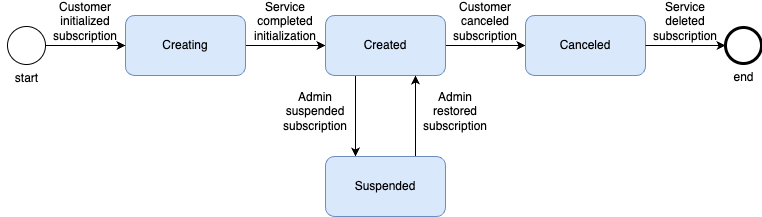
A state machine describes the state of a resource and how to transition between states. It is easy to visualise.
Figure 1: An example of a state machine for subscriptions
JSON model for transitions
A transition involves the current status of the resource and the new status.
Example: JSON model of transition from CREATED to SUSPENDED
{
  "currentState": {        // from database
    "status": "CREATED"
  },
  "newState": {            // from request body
    "status": "SUSPENDED"
  }
}
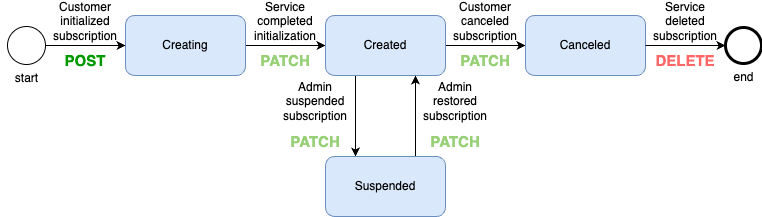
An API for this state machine can be implemented by populating the currentState from the database and the newState from the request body in an API patch call.
When creating a subscription there is no currentState (nothing to transition from). Creation can be done in an API post call.
When deleting the subscription there is no newState (nothing to transition to). Deletion can be done in an API delete call.
Figure 2: API methods for transitions of subscriptions
JSON Schema to declare transition rules
JSON Schema provides a declarative way to specify constraints (rules) for a JSON structure and we can declare valid transitions by specifying constraints for the JSON model containing currentState and newState.
Example: JSON Schema for transition from CREATING to CREATED
{
  "description": "CREATING -> CREATED"
  "required": ["newState", "currentState"],
  "properties": {
    "currentState": {
      "properties": {
        "status": {
          "const": "CREATING"
        }
      },
      "required": ["status"]
    },
    "newState": {
      "properties": {
        "status": {
          "const": "CREATED"
        }
      },
      "required": ["status"]
    }
  }
}
The JSON Schema above requires the model to contain the properties newState and currentState and both newState and currentState are required to contain property status. The value of the status property in currentState must be "CREATING" and the status of the newState must be "CREATED".
A JSON schema for all transitions can be specified by using the JSON Schema keyword anyOf:
{
  "anyOf": [
    {
      "description": "start -> CREATING",
      ...
    },
    {
      "description": "CREATING -> CREATED",
      ...
    },
    ...
    {
      "description": "CANCELED -> end",
      ...
    }
  ]
}
The full JSON Schema can be found under “Let’s build the API!” below.
Status code 409 for invalid transitions
The state machine API can use the JSON Schema to validate each transition (POST, PATCH, DELETE). When the state machine API detects an invalid state transition, the HTTP status code 409 (conflict) should be returned. Status code 409 means there is a conflict between the state on the server side and the request.
Lets build the API!
I will use the CRUD Builder to build the state machine API – it should be done in a minute or two and you will get a Swagger UI to play with.
If you want to skip the building part (I don’t think you should – it really is simple!) – here is the Swagger of the API I built.
Login to CRUD Builder
- Login to CRUD Builder with your Google account
Create a new API domain
- Click in the white box by the “New API” button. Subdomains of databiit.com will work out of the box (i.e *.databiit.com).
- Click “New API”
Create the subscription entity
- Create a collection named
subscriptionsin the lower left corner of the screen.
Specify one example of a subscription
The auto-generated example model has one subscription item which contains id and href. We also need status.
- Replace the content in the editor with:
[
    {
        "id": "654b78b91364",
        "href": "/subscriptions/654b78b91364",
        "status": "CREATED"
    }
]
Generate model from example
The example for subscriptions can be used to generate a model.
- Click on the “Model” tab
- Click on the “Generate model from examples…” button in lower right side of the page
By adding a pattern to the properties of type string we can get format validation
- Copy the following string to the pattern field of the
statusproperty:
^(CREATING|CREATED|SUSPENDED|CANCELED)$Configure state machine transitions
- Click on the “Resource state” tab
- Replace the content of the editor with this state transition JSON Schema:
{
    "else": {
        "else": {
            "properties": {
                "currentState": {
                    "properties": {
                        "status": {
                            "const": "CANCELED"
                        }
                    }
                }
            },
            "required": [
                "currentState"
            ]
        },
        "if": {
            "required": [
                "currentState",
                "newState"
            ],
            "description": "PATCH"
        },
        "then": {
            "anyOf": [
                {
                    "else": {
                        "properties": {
                            "newState": {
                                "properties": {
                                    "status": false
                                }
                            }
                        }
                    },
                    "if": {
                        "properties": {
                            "currentState": {
                                "properties": {
                                    "status": {
                                        "const": "CREATING"
                                    }
                                }
                            }
                        }
                    },
                    "then": {
                        "properties": {
                            "newState": {
                                "properties": {
                                    "status": {
                                        "const": "CREATED"
                                    }
                                }
                            }
                        }
                    }
                },
                {
                    "else": {
                        "properties": {
                            "newState": {
                                "properties": {
                                    "status": false
                                }
                            }
                        }
                    },
                    "if": {
                        "properties": {
                            "currentState": {
                                "properties": {
                                    "status": {
                                        "const": "CREATED"
                                    }
                                }
                            }
                        }
                    },
                    "then": {
                        "properties": {
                            "newState": {
                                "properties": {
                                    "status": {
                                        "const": "CANCELED"
                                    }
                                }
                            }
                        }
                    }
                },
                {
                    "else": {
                        "properties": {
                            "newState": {
                                "properties": {
                                    "status": false
                                }
                            }
                        }
                    },
                    "if": {
                        "properties": {
                            "currentState": {
                                "properties": {
                                    "status": {
                                        "const": "CREATED"
                                    }
                                }
                            }
                        }
                    },
                    "then": {
                        "properties": {
                            "newState": {
                                "properties": {
                                    "status": {
                                        "const": "SUSPENDED"
                                    }
                                }
                            }
                        }
                    }
                },
                {
                    "else": {
                        "properties": {
                            "newState": {
                                "properties": {
                                    "status": false
                                }
                            }
                        }
                    },
                    "if": {
                        "properties": {
                            "currentState": {
                                "properties": {
                                    "status": {
                                        "const": "SUSPENDED"
                                    }
                                }
                            }
                        }
                    },
                    "then": {
                        "properties": {
                            "newState": {
                                "properties": {
                                    "status": {
                                        "const": "CREATED"
                                    }
                                }
                            }
                        }
                    }
                }
            ]
        }
    },
    "if": {
        "properties": {
            "currentState": false
        },
        "description": "POST"
    },
    "then": {
        "properties": {
            "newState": {
                "properties": {
                    "status": {
                        "enum": [
                            "CREATING"
                        ]
                    }
                },
                "required": [
                    "status"
                ]
            }
        },
        "description": "POST"
    },
    "description": "JSON schema for validation of state before modifying items of type subscriptions"
}
Configuration is done! Now we just need to save and deploy the API before we can start testing.
Deploy your state machine API
- Click on the “Save and deploy” option in the top of the left menu.
- Click on the button “Save and deploy”
The API is successfully deployed when a green checkbox appears.
Test your state machine API
The API you just built contains a Swagger endpoint for testing.
- Click on the “Test with Swagger…”
- Test your API with Swagger!
Summary
We have seen that JSON Schema is pretty much all you need to build a finite state machine API.
We have used a subset of features in CRUD Builder to swiftly build and deploy an API using JSON Schema for validation.
More…
CRUD Builder is part of the API platform I am building where JSON and JSON Schema are first class citizens. The platform is created to simplify API development of custom API design styles and the design that comes with CRUD Builder is one example such API design style.
If you want to know more about CRUD Builder, JSON Schema, API development or anything related – I’ll be happy if you give me a ping!
I am also currently open to consulting or contracting.
https://www.linkedin.com/in/niklas-eldberger-9b45b2a
niklas.eldberger@zuunr.com
//Niklas

 letsbuildapis.org
Leave a comment